Shell access to your ix2/ix4 exposed! “Get yer red hot ssh here!”
So, I promised you guys in Iomega ix4-200d data reconstruction, ssh and more! that I would expose the password to login to the ix2 and ix4 as soon as I could. Well, your wait is finally over!
Let’s start as you normally would, by logging into the support console!
http://192.168.1.1/support.html
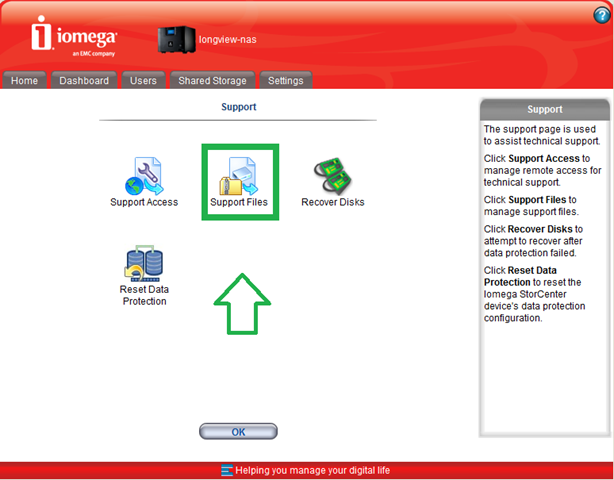
Whoa, what’s that I highlighted there and even tossed in an arrow?! Can I MAKE it any more straight forward? Psst.. Click on Support Files :)
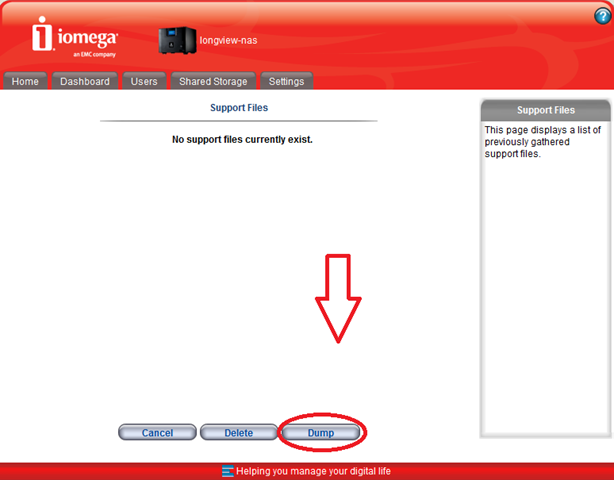
Ooh, what’s that little guy down there? Dump? Yea, I didn’t even notice this before (because I had shell access myself ;)) but this is for your benefit!
The system will go through "Gathering system state…"
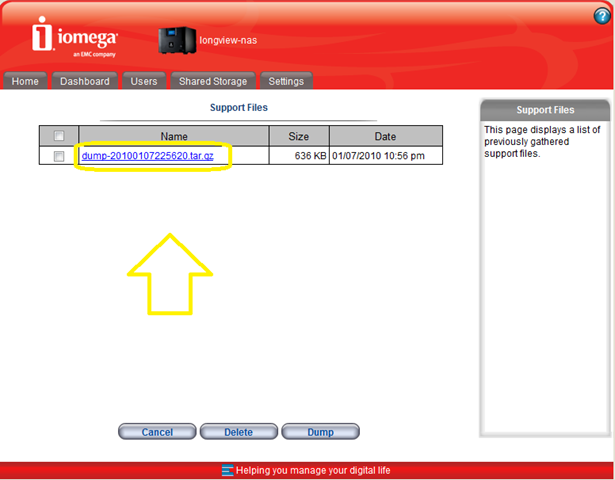
Why yes, I did go mad with clicking colors and arrows in the win7 version of MSPaint.. Okay, but I digress. :)
Click that bad boy, which will include dump data about your system! Download it, and open it!
Drill down into the dump –> config –> etc –> and open up the file named “shadow” (dump-20100107225620.tar.gz\dump-20100107225620\config\etc)
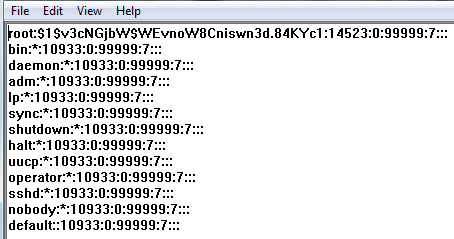
Find your shadow File in there, and lo and behold, you will have your Iomega root users hash! Now it’s just a matter of cracking it!
It is beyond the scope of this article to tell you how to actually crack the pwd.. (giggle) go here, download john the ripper and you’ll do just fine :)

Taking my seed from my system and running it through a simple alphanumeric search, I come up with username root, password soho! That was easy! That works if you have NO Password set!
Through a collaborative effort with @randyjcress @Kiwi_Si @VirtualisedReal and @gabvirtualworld we were able to determine that by using soho and whatever password you use on the system, that should do it! And really, the credit does primarily go to @randyjcress for leading us in that specific direction so props randy! :)
ie: admin pwd is apples, so login using sohoapples – This is still undergoing verification, but I thought I’d share it out there, while we sort it out!
Disclaimer: The means to perform all of these tasks has been replicated and verified in the wild without requiring any intimate knowledge of the inner workings of the system.
I tried all possible combinations (using john) up to 8 chars, so I can guarantee its > 8 chars.
Thanks for that Matt! which basically means we're stuck with dictionary attacks at this point!
This is good news!
soho is also the password of the ix2 box.
I have been running john for 14 days now. Apparently it was using the wrong seed:
tail -1 john.log:
14:01:10:58 – Trying length 7, fixed @4, character count 23
Glad you found success on yours! Now it's just down to figuring out the other ones, if such an option exists.. :) I wonder what date the pwd really changed on a device by device basis!
Great thanks alot Chris put a link to your info here http://iomega.nas-central.org/wiki/Main_Page
curious!! can multiple Macs hit these suckers for a time machine target? or just one?
I'm not certain, but I don't see any reason why not?
So , I think you can!
Thanks! I really appreciate that!
Awesome! I can confirm that this works on the IX2 (silver) with firmware 2.0.15.43099. I have quite a complex password and had no problem accessing via ssh using:
ssh root@<ip address>
password: soho<complex password>
A couple of questions:
– Do you leave the support access enabled or do you modify something in the busybox and then disable it? At the moment when I look at the dashboard it just says “Remote support access is currently enabled.” So, I can't really tell the status of the device.
– The option “Detailed logging”. Where is this stored and how can I view it? I looked under Settings > Event Log, but it is no different than before.
– Is it possible to forward logs to a syslog server?
– What is the “proper” way of shutting down the device via ssh? I want to create a script so that when there is a power failure my APC network management card can forward a shutdown command.
– Is it possible to power on the device via ssh when it has been shutdown?
Sorry for all the questions. Maybe someone here has explored some of these things and is willing to share ;)
Thanks
1. Leave support access on or you will disable ssh.
2. Use to find your logs 'find . -name “*.log”' you could then push them to your syslog server using rsync.
3. 'shutdown -h now'
4. You may be able to use wake-on-lan in some way however I'm not sure on this one, go google some tutorials.
Hope this helps
Tested, works! Freakin marvelous, worth every penny in such a little package. I'm protecting 10 macs with this thing.
Great!
I was trying to rebuild the raid on a pc, thanks Good I find your article before writting superblocks XD
FYI, mine is a ix4-100.
It works
Just did it on 2.1.25.229 – latest ios. Great info…thanks.
Glad it worked out for you :) IOS is specific to Cisco though for what it's worth! :)
Make sure you upgrade your firmware too! :)
i cant get it work on my iomega ix2 firmware version 2.0.15.430999 …i have set an admin password and m using ssh root@ip and password as “soho+adminpassword”…and is not working…also tried user : root and password : soho…
but stilll not working…can some1 please help…as m writing have initialised john riper on the shadow file…lesse wat it shows…also it shows as only 1 password hash instead of 3 shown in the example above…
So can some1 who has got it working please help…
Thanx
You did try:
user:root
pwd: soho(and following that type your admin pwd)
like
pwd being hat
root
sohohat
Hey that workedd…!!!!!!!!!!!!!!!… :)
Excellent! Glad to hear it worked! Take this opportunity to channel that success in to.. Joining the Red Team (for charity :)) Your help is greatly appreciated :)
Just sign up here!
http://borntolearn.mslearn.net/prix/p/registrat…
Yeah sure y not…registered at ur url…Ur help is appreciated…
I have just bought an ix2 (with no suffix such as -200 etc). I upgraded to firmware 2.0.15.43099, and on Settings I do not have an option to enable SSH (I have ftp, SNMP, CIFS, Mac filesharing). Is there any other way to enable SSH without removing the disks, which I assume would void my warranty?
what is the integrated torrent client – still looking for it.
where are the torrent files stored?
how can I compile a new program to run on the system? Is it a standard distribution?
I’m still working on some manually handling Torrent process.. I haven’t published anything on it yet as I haven’t found anything good to publish on doing it yet :)
hola a todos, una pregunta, puedo cambiar la web de la interface? personalizarla? con el logo?
Did not work on Software Version: 2.1.30.10908
Update – This method does work! Thanks Christopher for the original info and Stefan for making me think ;-)
For Newbee’s 2 Linux U need 2 use an SSH client like PuTTY to get to the # prompt – using the web interface to the device is not a valid way to check you have the right root level password “incase” you ever need it for an SHH session as I was doing – not sure what I was thinking about, I suspect I just wasn’t :-(
Glad you found this useful!
works here with soho+admin-password (used version 2.1.38.22294)
Thanks a lot :)
For px6-300d (firmware 3.2.3.15290) only works in this way too, soho+admin-password
Chris – this is excellent. Now any tips on disabling CIFS? I’m an NFS/AFP/FTP household.
I can definitely dive in to that – But why in particular do you want to disable CIFS?
With that in mind… let me know and then I can drill down into actually disabling it! :)
work on ix4-100 too, but to do what ?
Very useful for shell like operations! or even changing file permissions, a lot of us do that..
genious…that work on my IX2 (2.0.15.43099)….any chance of a tutorial to install Squeezebox server onto the ix2?
Great tutorial!
Just a though… Lets say that I mess around with some WOL settings etc. and I somehow makes the system go down… Will I be able to reset the system to default configuration?
I know theres a reset button on the back of the ix2-200, but if I mess with the Linux OS manually then I am not sure if the default “installation” is saved somewhere safe to save the system for people like us ;-) ?
Anybody?
awesome
Now, we are allmighty. What fine stuff to do?
Anybody made a cross-build environment to port wget, ncftp, torrent, emule, what-the-hell?
Does not seem to work on ix2-200, firmware 192.168.0.189
You may want to go through iterations of this, because I’ve heard of people not doing it right the first time, and once they realize what they’re doing wrong it works just fine :)
Chris, brilliant cracking. Can you give any hints on how to enable oplocks on the ix2-200? I wish to use offline files (windows7), iomega tells me that’s not possible. Perhaps you know better.
Thanks guys! It works amazingly stunningly. I had a big problem, there were some directories that were empty but couldnt be deleted by mac os x for whatever reason. But with straight shell access to my ix2-200 i could clean up the files I wanted without formatting the whole NAS and starting all over with almost 2TB of data! (sigh).
BTW does anybody know if/how the ix2-200 can be upgraded to cloud edition?? Iomega support told me that its not possible.. it must be only software on the NAS..
Let me see if I can find the product manager for the IX4 and for the Cloud version and see if that’s something which can be done (either on the roadmap or a hack.. :))
I am definitely interested in trying to upgrade my “old school” ix2-200 to the new cloud edition as well. Please do keep us posted!
Hi Buck, did you find a way to upgrade to cloud edition?
Hi Chris, great work here, love my ssh on the ix2-200. Did you find a way to upgrade from a non cloud ed to cloud?, I have two ix2-200 units and I would love to use the cloud edition …
I have also a ix2-200 with the lastest firmware (3.0.9.37355)
But on my device, the address http://my-ix2-address/support.html doesn’t exist.
Is the procedure changed and if yes, how can I activate the SSH access ?
You may want to check again, or try fully populating your IP address a few times; lets just say… I’ve not seen it NOT work yet.
What IP are you trying to use?
I just found one other guy who have the same problem around the 12 april 2011 : http://ix2-200.wikidot.com/forum/t-272682/ssh-restrictions
I’m using my ix2-200 on http://192.168.0.250
It’s working well : for the moment, I’m using it for stoarage with nfs access.
There is one thing which disapointed myself : the manager interface is not the same as you in my device.
Have a look :
– when I go to http://192.168.0.250 I have this : http://img.spheerys.fr/images/nothing.png
– when I go to http://192.168.0.250/manage.html I have this : http://img.spheerys.fr/images/manage.png
– when I go to http://192.168.0.250/support.html I have this : http://img.spheerys.fr/images/support.png
It’s look like the last firmware change the interface and the procedure to activate the ssh access.
I found the solution on the Iomega Forum support : for the “Cloud Edition”, the new address is http://my-ix2-ip/diagnostics.html
Okay, now I have done with I wanted to with ‘ssh’ access, how do you turn it off? I have an IX-200 Cloud Edition and I’ve gone back to the support.html file, well, actually, it is diagnostics.html for the cloud version, unselected the check mark next to “allow remote access for support” and clicked Apply. Unfortunately, the check mark reappears and as expected, ssh access remains. Do I have to reboot this thing to get it to stick?
In a word. Yes, yes you have to reboot it for the SSH access to turn off.
you lose the warranty like this
Hello,
I have a ix2-200 , and how can upgrade it to Cloud Edition.
thanks
Dave
I’ve heard that you CAN upgrade the ix2 to CLOUD EDITION… HOW???
Hi there,
This wiki page contains a set of instructions in order to recover the NAND or replace the internal HDDs:
http://iomega.nas-central.org/wiki/Category:Ix2-200-usb-init
This would not only allow us to swap the HDDs in the ix2-200 to larger ones, but also upgrade (?) to the cloud edition.
I do NOT know if any of this works as advertised.
I have little knowledge of SSH and *nix and so forth. If
someone with proper know-how is willing to give it a try… pretty
please :)
If you need to perform some test in one of the devices and you don’t have it…
—- I have both ix2-200 (1 year-old model and the new Cloud Edition). —-
So I’m more than willing to help with what I can.
P.S.: I did try a basic and probably stupid thing:
1. Remove the drives from the older model;
2. Place just one drive from the Cloud Edition into the older model.
I imagined at first that it would boot as if it were the Cloud Edition,
but it doesn’t. It seems like there’s a part of the OS that’s stored in
the HDDs and another part (or firmware) stored in the board…?
I updated my USB Init page on NAS Central. Now also people who have only Non-Cloud Edition can update to Cloud Edition (on new drives). Only the original firmware file for cloud edition is required
Just a stupid question. Why don’t you use the first icon? Support access, and then check the ‘Enable support access via ssh…’? Afterwards, you can ssh with root & password soho-pwd…
I have the ix2-200 edition and wanted cloud as well. I’ve made it working, however not by a hack. I bought the transmit app http://www.panic.com/transmit/ (mac only) and have set that setup over ssh connecting to my ix-200. 2 minutes work and all can by accessed as a local drive. No read/write issues or other tech issues. Just plug and play.
I understand this procedure enables the SSH server on the ix2, that is, sshd. Is the ssh client also installed? That is, if I’m logged into an ix2, can I ssh to another machine? Is Python installed, too?
FYI:
Procedure works fine on a StorCenter px6-300d.
– enable ssh via http://nas/diagnostics.html
– use the described method to login as root
hi i have the iomega ix100 and tride to akses the thidden web page of iomega storcenter and ther is aproblem with the certiffecut and clikt the link and got 404 file not found can you help my emaile is hometeck20001@hotmail.com
Has anybody tried with http://iomega.nas-central.org/wiki/Category:Ix2-200-usb-init using the cloud edition firmware downloaded from iomega support site into non cloud ix2-200 if it works?? will it erase the drives or keep old data?? This would also add os x lion compatibility. I’d test it but dont have extra drives to try with.
I have 4x StorCenter ix2-200 with out iCloud and have buy a new one this is with iCloud but i dont like the system, is there a way to switch the firmware back to the old version?
Thx for your feedback.
What you’ve all been waiting for! My good friend Chris Colotti brings us:
How To: Convert an Iomega IX4-200D to an IX4-200D “Cloud Edition” bit.ly/vMbkWU (by @ccolotti)
http://www.chriscolotti.us/technology/how-to-convert-an-iomega-ix4-200d-to-an-ix4-200d-cloud-edition/
Someone has the instructions to update to ix4-200d to Cloud Edition? Colotti has removed
It looks like technically they’ve released a new(er) updated Firmware to take it to 2.1.40 which gives support for LION, though I imagine doesn’t convert it over to the Cloud Edition.
Having never actually gotten around to updating my IX4 to the Cloud Edition (Hey, I was busy! :)) What benefits did it particularly provide?
https://iomega-eu-en.custhelp.com/app/answers/detail/a_id/22315
The firmware 2.1.40 only adds support to the lion.
I have the old version of ix4 and I also tried the version cloud edition.
it has a new interface and management different from the old, new applications have “cloud” and some applications to synchronize their profiles in social networks
Hi Christopher, if you have the update files and instructions, you could send them to me or make it public?
it works on ix4-200r, 2.0.4.41587
i’m amused :-)
This just worked with my “iomega 34785 3TB Home Media Network Hard Drive, Cloud Edition”, purchased last week (http://www.newegg.com/Product/Product.aspx?Item=N82E16822186283), with the latest firmware.
I went through the whole cracking process to find it’s still root:soho
I forgot to mention, I had to use /diagnostics.html, as described by Magneto below.
the soho plus admin password is ACCURATE
LOL!!!!!!! very nice article, and how iomega can be so stupid to put the shadow file in your dump file????? haahhahahahha…very nice! tks!