iPhone Live Listen Remote Control May Already Be Enabled: What It Does and How to Turn It Off
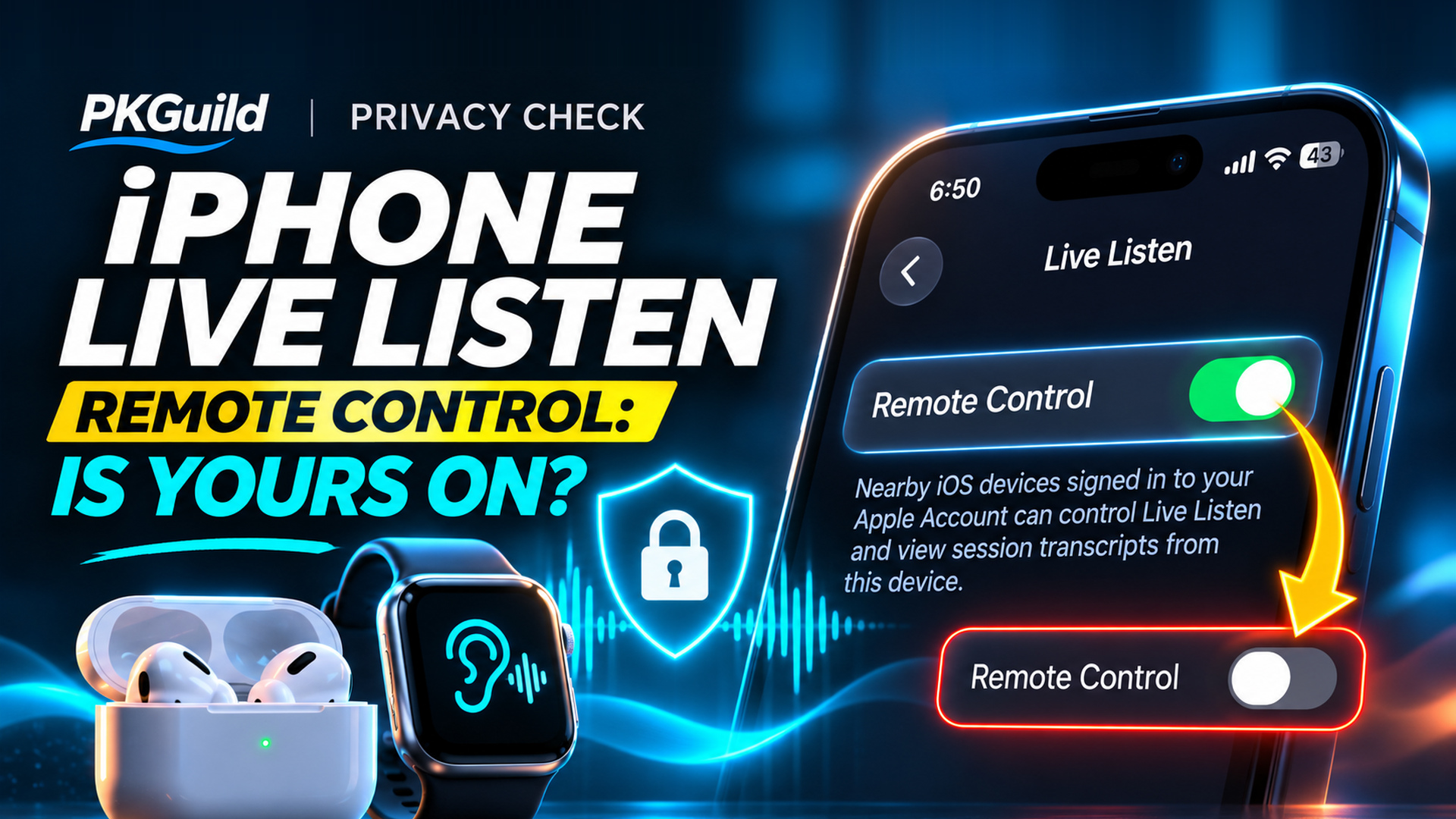
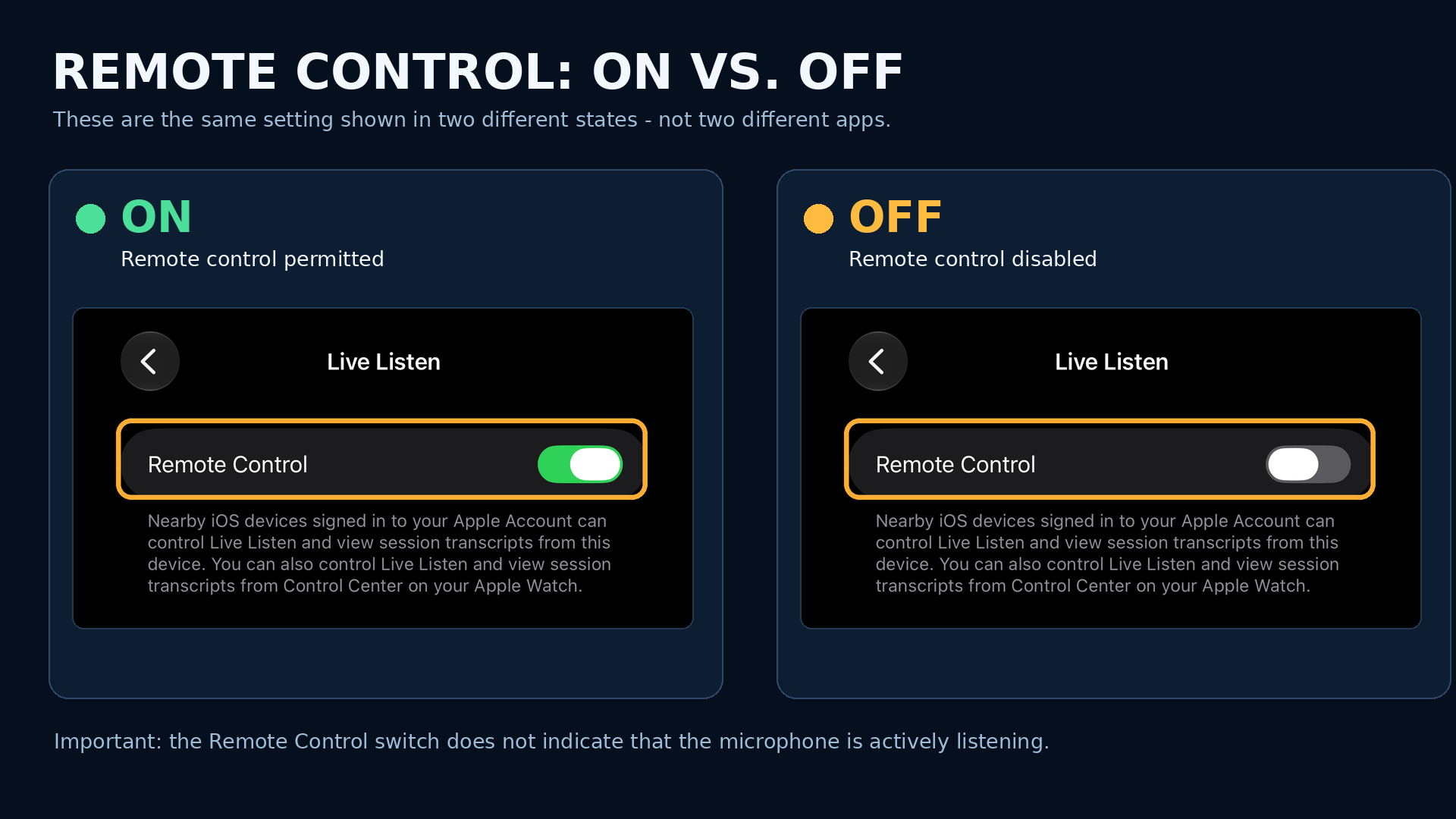
On an iPhone recently updated to iOS 27.2.1, we found a privacy-related setting enabled even though we had never knowingly turned it on. The option is called Remote Control, and it is buried within Apple’s Live Listen accessibility feature. Our screenshots show the option enabled, the navigation path, and the result after switching it off.
This does not mean that the phone was secretly recording conversations. But it raises an important security question: Could someone misuse its microphone or live transcripts, what access would that require, and how can you prevent it? We reviewed Apple’s documentation, reporting from independent technology writers, and government guidance on mobile-device privacy to separate documented capabilities from plausible misuse scenarios and unsupported speculation.
First: Check Your iPhone in Less Than a Minute
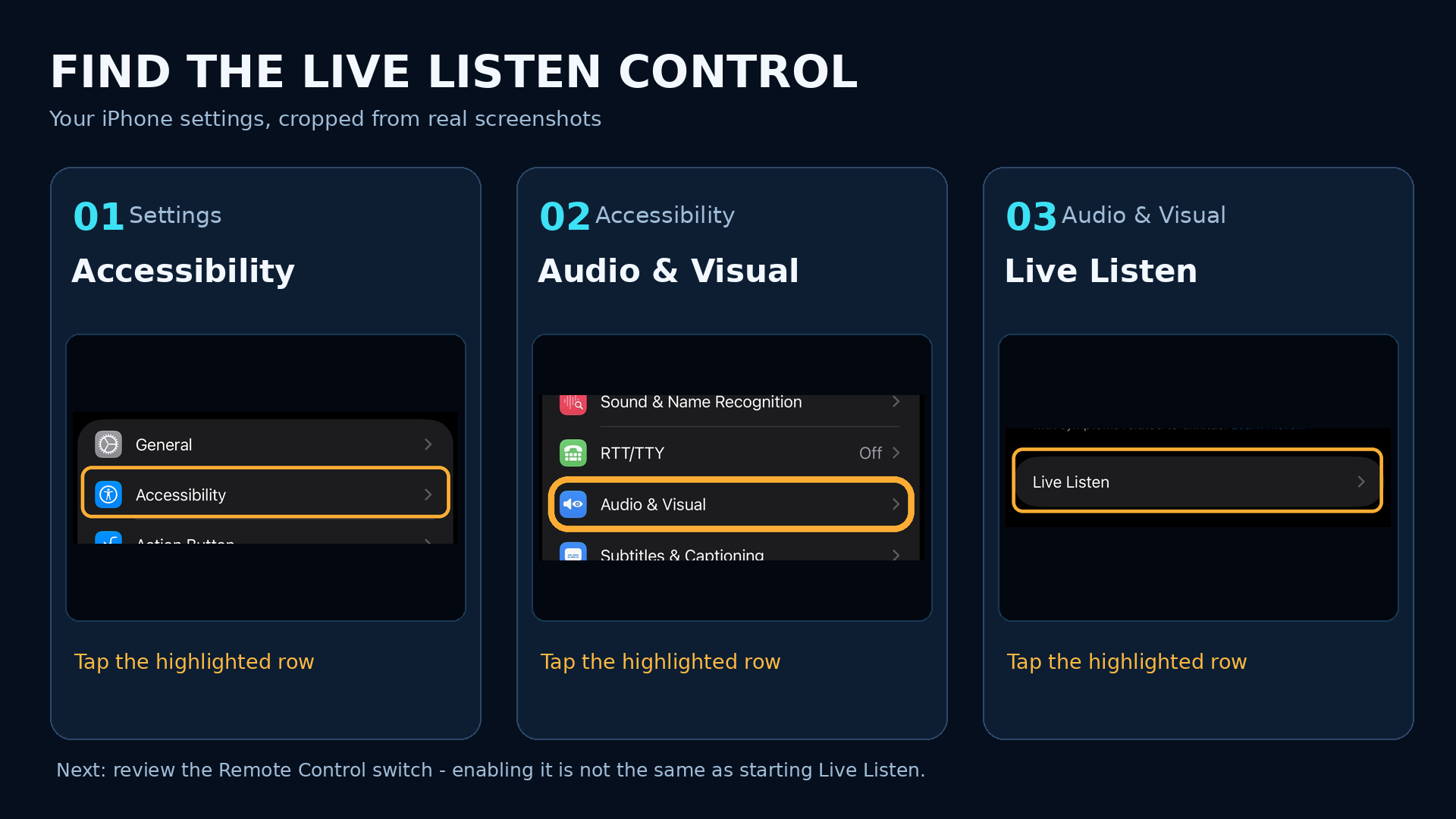
Open Settings → Accessibility → Audio & Visual → Live Listen → Remote Control. If the toggle is green, Remote Control is enabled. If you do not use Live Listen controls on another Apple device, you can switch it off. This disables the companion-device remote-control option; it does not uninstall Live Listen or necessarily stop an active session.
Why Was Remote Control Already On?
We did not knowingly enable it, and it was on after updating to iOS 27.2.1. That is a direct, firsthand observation. However, a screenshot of the current setting cannot conclusively tell us when it became enabled or whether an update changed it. A controlled before-and-after installation test would be needed to establish that.
Independent reports suggest this is not an isolated observation. On November 9, 2026, Glenn Fleishman at Six Colors reported seeing Remote Control enabled on an iPhone without having configured it, with similar experiences reported by others. A November 13 Snopes fact-check also found that the option appeared to be enabled automatically on some devices. Apple has not published evidence that it is the default on every iPhone or that iOS 27.2.1 specifically changes it.
The feature itself predates iOS 27. Apple announced expanded Live Listen controls and captions in May 2025, and its iOS 26 user guide explicitly documents the functionality. So the accurate takeaway is not that iOS 27 secretly introduced a new surveillance mechanism, but that some users may find a real remote-accessibility setting enabled without recalling ever opting into it.
What Live Listen Actually Does
Apple describes Live Listen as an accessibility tool that uses an iPhone’s microphone to send nearby audio to supported AirPods, Beats headphones, or Made for iPhone hearing devices. It can help people hear a conversation in noisy surroundings. With a Live Listen session running, compatible devices can also show Live Captions of nearby speech and allow a user to replay part of the session.
Remote Control expands this across compatible nearby Apple devices on the same Apple Account. Apple’s Apple Watch instructions expressly describe starting, stopping, and controlling Live Listen from a paired Watch once it has been configured. Its accessibility overview also describes access from nearby iPhones and iPads on the same account.
That is important, but it is not unrestricted remote access. Apple does not describe this setting as allowing an arbitrary person on the internet to browse your photos, control all your applications, or connect from an unrelated Apple Account. Likewise, simply seeing Remote Control enabled does not establish that Live Listen is currently active. These are distinct things: permission for a compatible remote control versus a listening session actually operating.
How Could a Malicious Actor Misuse Live Listen?
The most important security question is not whether Apple uses this for advertising. It is who could capture or read a private conversation, under what conditions, and what controls stop them? A microphone, remote-session controls, and live transcripts can be sensitive capabilities even when implemented for entirely legitimate accessibility purposes. The scenarios below describe possible misuse and the access each would require; they are not reports of an observed exploit.
1. Intentionally leaving a phone near a confidential conversation
Someone with legitimate access to their own iPhone could deliberately position it in a room and initiate Live Listen to hear nearby conversation through supported hearing devices or view captions. In offices, conference rooms, homes, or other sensitive spaces, that can expose speech from people who do not know they are being overheard. Prerequisite: a functioning Live Listen session, compatible equipment, and physical placement close enough for the microphone to pick up speech. Simply having Remote Control switched on does not mean this is happening.
2. Misuse of a nearby, already-authorized Apple device
Apple’s Apple Watch instructions expressly say a nearby paired Watch can start a new Live Listen session once Remote Control and the Watch’s hearing controls have been configured. Apple’s iPhone guide also describes nearby, same-account devices controlling sessions and viewing transcriptions. That means the device-trust boundary deserves attention: someone with unauthorized physical access to an already-paired Watch or other qualified account-linked device might potentially misuse those controls, depending on its lock state and setup. Prerequisites: compatible authorized devices, relevant configuration, proximity and device access. It is not a general-purpose internet connection to another person’s iPhone.
An important documentation nuance: a November 13 Snopes fact-check characterized the feature as requiring a user to initiate a session on the iPhone, whereas Apple’s current Watch guide explicitly describes starting a new session from a previously configured Watch. These statements differ in how they describe initiation and prerequisites. We have not independently tested every device combination or an attacker scenario, so we will not claim that a stranger can switch on an otherwise unconfigured or locked iPhone.
3. Exposing sensitive speech through live transcripts
In an authorized Live Listen session, captions can reproduce speech picked up near the iPhone on a nearby compatible device. That creates possible confidentiality concerns for meetings, financial discussions, personal conversations and protected information. This is a data-exposure risk if the feature is intentionally or improperly operated, not evidence that Apple is continuously collecting every conversation or that a stored recording exists whenever the switch is green.
4. Broader account or device compromise: a separate risk
Stolen devices, shared passcodes, unauthorized Face ID or Touch ID enrollment, and compromised Apple Account access are worthwhile security concerns on their own. But the presence of Live Listen Remote Control does not prove any of those compromises, and there is no documented authentication bypass caused by this toggle. If you suspect another person has access to your account or device, review signed-in devices and use Apple’s Safety Check. For a suspected sophisticated compromise, follow your organization’s incident-response process rather than relying solely on switching off this option.
5. Why sensitive workplaces still care
Federal mobile-security advice recognizes that ordinary phones and smartwatches can become passive-listening risks when placed in sensitive environments. CISA’s Federal Mobile Workplace Security guide (August 2024) advises awareness of passive listening devices and recording or live-streaming. That guidance addresses the general operational-security problem; it does not identify a Live Listen vulnerability or validate a specific warning about Apple’s feature.
Is Live Listen Being Used to Target Advertisements?
Seeing an advertisement for something discussed aloud can feel remarkably specific, but that correlation is not proof that Live Listen recorded the conversation. Ad targeting can reflect searches, app activity, location, prior purchases, shared household interests and other behavioral signals, without using a phone’s ambient microphone. Apple says its advertising platform uses limited contextual and service information and does not track across other companies’ apps and websites for its ads. We found no credible evidence connecting Live Listen Remote Control to continuous microphone surveillance or the sale of conversation transcripts to advertisers.
That does not mean readers should ignore broader digital-advertising privacy concerns. It means those concerns should be investigated with relevant tools rather than attributed to an accessibility setting without evidence. Apple’s Apple Advertising settings and App Privacy Report provide useful places to start.
Should You Turn Remote Control Off?
If you do not use the companion-device control features, turning Remote Control off is a reasonable least-functionality choice. You are removing a capability you do not need, rather than responding to evidence that your phone has been compromised. You can turn it on again if you later need it.
If you rely on Live Listen for hearing assistance, there is no reason to stop using an accessibility feature solely because its controls sound alarming. Understand which devices can operate it, secure your Apple Account, and follow any relevant work-device policy. On a government-issued or corporate-managed iPhone, organizational requirements should take precedence.
Additional Security Checks Worth Making
- Inspect linked Apple devices: Open Settings → your name and review the devices on your Apple Account. Remove devices you no longer own or recognize. See Apple’s account and device checklist.
- Check who can unlock the iPhone: Review your passcode, Face ID or Touch ID enrollment and physical access to any paired Watch. Securing the actual devices matters more than changing a single toggle.
- Review microphone permissions: Open Settings → Privacy & Security → Microphone to examine which apps have requested access. Apple also documents the orange microphone-use indicator and recent access details in Control Center. See Apple’s hardware-access guide.
- Enable App Privacy Report: Under Settings → Privacy & Security → App Privacy Report, turn on reporting if it is not already enabled. Apple says it tracks app sensor access and network activity from the time you enable it; it cannot retroactively prove what happened before then. See Apple’s App Privacy Report explanation.
- Use Safety Check when appropriate: If you are worried someone may have unauthorized access to your personal information, Settings → Privacy & Security → Safety Check can help review people, apps, devices and sharing. See Apple’s Safety Check instructions.
What We Can and Cannot Conclude
| Finding | Assessment |
|---|---|
| Remote Control was enabled on our iOS 27.2.1 iPhone without us knowingly turning it on | Directly observed |
| Other people have observed it enabled without configuring it | Independently reported |
| Apple provides Live Listen remote controls and transcripts on compatible nearby account-linked devices | Documented by Apple |
| Every iPhone enables this option by default or iOS 27.2.1 is the exact cause | Not established |
| A green Remote Control switch means the microphone is always on | Not supported |
| Qualified same-account nearby devices can control sessions, including starting one from a properly configured paired Apple Watch | Documented by Apple; prerequisites apply |
| The feature could be intentionally misused to overhear or transcribe nearby speech | Credible threat scenario, not a demonstrated vulnerability |
| This setting gives arbitrary outsiders unrestricted access or feeds advertising systems | Not supported |
The Bottom Line
Check the setting, audit the devices that can access your Apple Account, and disable Remote Control if you do not need it. The security issue worth understanding is the potential misuse of a microphone and live transcript by someone with the necessary device access and configuration. An enabled setting alone is not evidence of active eavesdropping, a compromised iPhone, or advertising surveillance. Removing an unnecessary remote capability is sensible defense-in-depth, while preserving Live Listen for people who rely on it.
Editorial note, November 17, 2026: This article is based on user-supplied iOS 27.2.1 screenshots, Apple’s published documentation, independently published reporting, and government guidance. It is not a controlled test of factory defaults, network traffic or unauthorized remote activation, and it does not claim to have identified an exploit. Threat scenarios are clearly marked as possibilities rather than observed attacks.
Discover more from PKGuild
Subscribe to get the latest posts sent to your email.