Stop Opening Every VCF Port: How 1,063 Entries Became 224 Rules
A new November 2026 walkthrough of the VCF Firewall Planner illustrates why the entire VMware Cloud Foundation ports catalogue is not a firewall change request. The real engineering work is deciding which services exist, where traffic actually crosses an enforcement boundary, which flows are essential, and how to prove that exclusions are safe. Here’s a practical, independent method for turning a large product-reference list into a reviewable, testable network design.
Would you send your firewall team every line from the VMware Cloud Foundation ports catalogue and ask them to approve it? The source documentation should be comprehensive, but a deployment-specific rulebook should be selective. A port listed for an optional product, a feature you have not enabled, or communication that never crosses a firewall boundary is not automatically a rule you need to request.
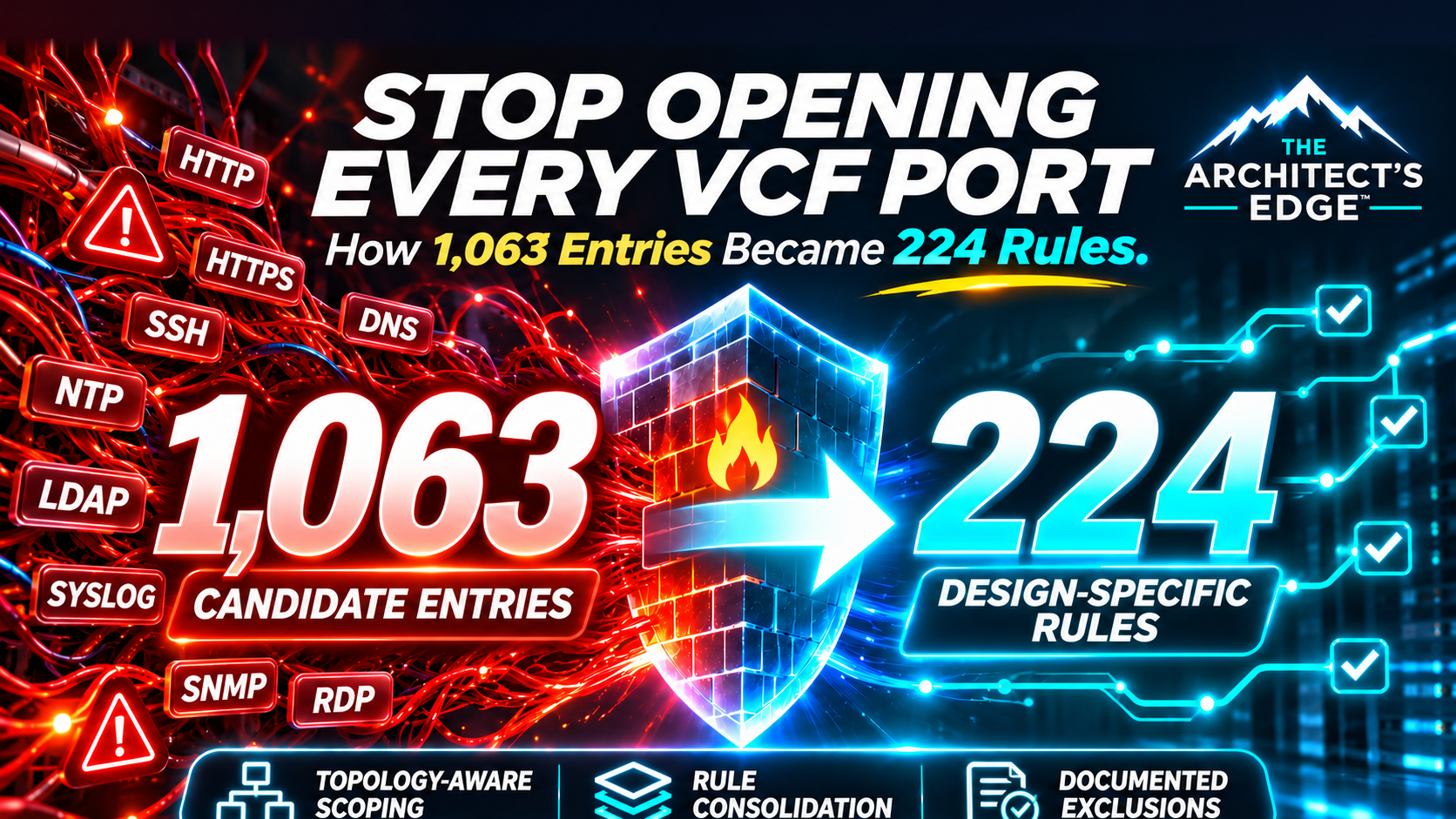
In a November 9, 2026 Broadcom engineering walkthrough, architect Syed Qamar demonstrated a tool that starts with 1,063 candidate catalogue entries and arrives at 224 design-specific rule entries in a sample ACME assessment. It is an unusually useful example of a widespread design problem: enterprises can possess an authoritative port reference while lacking a defensible explanation for which flows they need to permit.
The 224 number is an example, not a universal VMware Cloud Foundation requirement. Another network topology, feature set, VCF release or security boundary can produce a larger or smaller rulebook. In particular, the steps combine scope reduction, network-boundary reasoning, and rule consolidation, so subtracting 224 from 1,063 does not imply that 839 required communications were safely removed or that every consolidated row is the same kind of original candidate entry.
The most useful principle: A ports catalogue is not an approved firewall policy
The official VMware/Broadcom Ports and Protocols portal is a reference for product communications. A deployment has additional context that the catalogue cannot infer: the products actually installed, the services in use, the source and destination VLANs, routing decisions, microsegmentation boundaries, proxies and external services, and lifecycle operations that might only occur during upgrades or disaster recovery. A production firewall request must join the technical reference with those environment-specific facts.
Consider the difference between two otherwise identical environments. One uses vSAN, VKS and Avi; the other uses external storage, no Supervisor, and no Avi. Even before the topology is considered, their required product traffic differs. A design with same-VLAN Layer 2 communication differs from one that forces inter-zone traffic through a firewall. In a microsegmented environment, traffic that avoids a north-south firewall may still encounter a distributed firewall. That is why the rulebook must identify which enforcement point is responsible for each flow rather than indiscriminately removing everything described as local traffic.
Internal versus external: Where does a firewall rule really belong?
“Internal” describes where a service lives, not whether its traffic is exempt from security controls. Similarly, “external” might mean an enterprise DNS server outside the VCF management domain, a corporate backup platform, a partner service, or a destination on the public internet. Each can cross a different enforcement boundary. The better question is which source talks to which destination, along which path, and which device or policy actually enforces that path?
| Traffic class | Representative example | Firewall-team decision |
|---|---|---|
| Inside a VCF network / same VLAN | Two platform endpoints communicate on the same Layer 2 segment. | No routed firewall rule may be needed, but verify host firewalls, NSX DFW or other in-path controls. Do not equate “same VLAN” with unrestricted traffic. |
| Between internal VCF networks | Management services communicate across separate VLANs or security zones. | Determine whether a top-of-rack switch, firewall, NSX DFW or another enforcement point handles the flow. If routing bypasses a particular firewall, don’t request a meaningless rule on that device; check other controls. |
| VCF to shared corporate services | VCF components use enterprise DNS, NTP, Active Directory, syslog or backup services. | These services are external to VCF but often internal to the enterprise. Validate destination, direction, protocol, trust zone and the applicable internal segmentation policy. |
| VCF outbound to vendor / internet services | Lifecycle depot, compatibility lookup, licensing or management-pack access. | Evaluate outbound egress, approved FQDNs, proxies, TLS inspection and return traffic against current version-specific documentation; an inbound management rule does not solve outbound egress. |
| Administrative access into VCF | Authorized administrator or jump host connects to a management endpoint. | Restrict source networks and identities, use approved management access paths, and avoid opening management services to general workload networks or the internet. |
Who does what? The VCF architect supplies the release-specific component inventory and required application flow; the network team establishes the route, VLANs, gateway and actual path; the firewall/security team validates trust boundaries, policy scope, direction and least privilege. All three should sign off on the same source/destination/port/protocol record, with the justification for any exclusion.
This explains why the VCF Firewall Planner walkthrough treats routing and same-VLAN flows separately from internet egress. For additional hardening context, Broadcom’s management-network isolation guide explains why VLAN separation alone is not an effective security boundary. The familiar service names on our featured illustration—HTTP, SSH, DNS, NTP and others—are examples to investigate, not a list of ports every VCF environment should open.
What the new VCF Firewall Planner actually does
The walkthrough describes a 12-step assessment for VCF 9.1. It starts with a named design, selects a management networking model, enables only installed products and add-ons, chooses infrastructure services, excludes unused features, and assigns gateway/routing behavior for each VLAN. It then consolidates duplicate source/destination flows, suggests external egress destinations based on current documentation, applies design decisions, filters Layer 2 same-VLAN paths, and exports an explanation of included and excluded entries. The critical output is not merely a shorter list—it is a reasoned record of exclusions for security and architecture reviewers.
| Planner phase | Architect’s question | Evidence to retain |
|---|---|---|
| Scope | Which VCF products, add-ons, infrastructure services and features are truly deployed? | Installed component inventory, release, optional feature decisions and exclusions. |
| Topology | Which VLANs, subnets, segments, gateways and enforcement points handle each flow? | Network diagram, route ownership, DFW/physical firewall boundaries. |
| Consolidation | Which rows describe the same flow and can be aggregated without broadening access? | Original port/protocol entries mapped to final source–destination rule groups. |
| Egress and lifecycle | What external URLs, ports, proxies and upgrade-time services are needed? | Broadcom KB/TechDocs citations, destination validation and proxy controls. |
| Validation | Why is every excluded flow safe to omit, and which tests prove the included paths work? | Exclusion reasons, change approvals, packet/connection tests and rollback plan. |
In Qamar’s example, only 9 of 13 products, 2 of 9 add-ons, and 5 of 10 infrastructure services are selected. One consolidation step reduces 662 lines to 282; a later topology-aware step brings the included rule count to 224. An exclusion summary records 559 excluded catalogue entries with reasons. These figures describe different checkpoints and operations—some remove irrelevant entries while others combine several original rows into one rule. They should not be added or subtracted as though they were all the same unit.
Where a planner can save a deployment—and where it can mislead
A planner has immediate value before an installation request reaches a security team: it makes assumptions visible. Did we really enable VCF Automation, VKS, vDefend or Data Services Manager? Is an edge router or a top-of-rack device routing between these zones? Are the ESX/vCenter paths subject to NSX Distributed Firewall rules even when a physical firewall is never crossed? What happens when an appliance is upgraded, a node is replaced, or the environment needs to access Broadcom download and licensing endpoints?
These are not theoretical traps. Broadcom KB 456798 documents a VCF 9.1 convergence failure during creation of a Salt RaaS service account because of blocked management-services communication. KB 458322 describes VCF Automation deployment failures in microsegmented environments and notes that relevant traffic must be considered across physical and NSX distributed firewalls. KB 443166 explains how changed VCF 9.1 lifecycle services can require different source IPs or FQDNs for depot access than older SDDC Manager-only allowlists anticipated. A rulebook grounded in the wrong release or source subnet may look tidy while breaking the next upgrade.
For VCF and VVF 9.1, use Broadcom’s version-specific public-URL requirements, which are also referenced from KB 327186 (the public-URL list for earlier VCF versions). A planner can suggest egress destinations such as dl.broadcom.com or eapi.broadcom.com, but the security team must still check the current documentation, authoritative destination, service owner, DNS resolution, proxy/TLS behavior and necessary directionality. Do not assume a hostname or IP range from an old design remains correct indefinitely.
The blog also describes AI-suggested egress rules. Treat those as candidates for human review, not automatically approved firewall exceptions. Verify against a first-party source and business use case; record who approved each external destination and how it will be reviewed when the vendor updates its endpoints.
Three VCF 9.1 firewall gotchas that illustrate the method
1. Syslog: A reachable port is not necessarily an accepted log flow. Broadcom KB 454002 documents that VCF Operations 9.1 Log Management does not accept non-TLS syslog over TCP/UDP port 514 by default, even when connectivity checks succeed. The KB recommends syslog over TLS on port 1514; there is also a documented option to enable non-TLS reception, though TLS is the preferred security posture. This is a receiving-service configuration detail, not a claim that all vCenter 9.1 syslog traffic is blocked or that every vCenter/ESX logging destination must use 1514. Older KB 430675 concerns a different vCenter 8.0 path and should not be cited for the VCF 9.1 default.
2. VCF Operations connected licensing and management packs: Outbound TCP 443 must reach the right services. KB 431546 calls for outbound HTTPS to eapi.broadcom.com and vcf.broadcom.com from VCF Operations nodes when registering with the VCF Business Services Console. KB 440605 documents management-pack download failures when outbound connections are blocked; it lists additional endpoints that may be relevant to the particular workflow and explains manual .pak installation as an alternative. Opening 443 generically is insufficient: source nodes, DNS resolution, proxy policy, TLS inspection and the exact destination set matter. Do not automatically expose every endpoint named in a different product’s KB.
3. NSX DFW and License Hub: Check enforcement points, not just ports. A north–south firewall rule may be correct while an NSX Distributed Firewall policy still denies an appliance’s licensing traffic. If licensing registration fails in an NSX-protected environment, inspect the affected VM’s DFW membership, applied tags/groups, policy order, exclusions and traffic logs before considering any change. Do not create a blanket DFW exclusion as a generic requirement; a specific exclusion needs current product documentation, a narrowly scoped risk review and an approved design. An unverified claim that the License Hub always requires an exclusion would be too broad to publish.
One necessary caution: The planner is hosted outside Broadcom’s primary documentation sites
The walkthrough directs readers to ports.vcf9.ai, where the application asks users to register with a work email. The Broadcom blog’s own disclaimer explicitly identifies the planner as Syed Adeel Qamar’s personal project, not an official or Broadcom-supported VCF tool. Its appearance in an official technical walkthrough does not make the external service a Broadcom SaaS product or establish its hosting, data-handling policy, security controls or support entitlement. Before uploading a customer design, identify who operates the site, review its privacy and retention terms, confirm organizational approval, and determine whether detailed networks or client names may be entered there at all.
For sensitive projects, the methodology can be applied independently using internal spreadsheets, design workbooks and the Broadcom port reference. You can reproduce the logic—scope, routing, consolidation and exclusion justification—without uploading real hostnames, IP ranges, segmentation diagrams, account identifiers or customer-specific attributes to an unapproved service.
One additional community-developed option to evaluate is VCF Designer, whose developer describes browser-side VCF 9.x design validation, HLD/diagram generation and Excel exports, with an offline-capable workflow after initial loading. The website’s client-side/no-upload statements are vendor claims, not an independent security audit; confirm network behavior and data-handling terms with your security team. This is a design and documentation alternative, not a verified one-for-one replacement for a 1,063-line firewall catalogue rule engine. Check current trial/subscription terms rather than assuming it is free or approved for confidential customer projects.
Our recommended network review: Eight checks before opening ports
- Freeze the software bill of materials. Specify VCF release and patch, deployed management components, optional workloads and planned upgrades. Build the list from actual inventory, not assumptions.
- Draw the traffic boundaries. Map each component to source/destination networks and identify the physical firewall, distributed firewall, security group or proxy enforcing each path.
- Prove which features are enabled. Only exclude flows for services you definitively will not use; account for maintenance, failover, backup, certificate renewal and DR scenarios as well as day-one installation.
- Verify port, protocol and direction. Validate every retained flow against a first-party KB, versioned ports reference or TechDocs page, recording the source revision.
- Consolidate narrowly. Merge truly identical source/destination flows, not unrelated subnets into broad allow-any groups merely to reduce a spreadsheet’s row count.
- Review egress separately. Check depot, licensing, telemetry, compatibility lookup, certificate and security service destinations; differentiate required from optional online connectivity.
- Approve exclusions explicitly. For each omitted row, keep the reason and supporting design fact. Make exclusions as auditable as allowances.
- Test and maintain the rulebook. Validate service health, upgrades, failover and recovery paths in a representative environment; log observed failures, maintain rollback steps and refresh the matrix after topology or release changes.
There is also an important difference between an application that tests connectivity and one that verifies application function. A reachable TCP port is a useful starting point, not proof that the correct service identity, certificate, protocol negotiation, routing or lifecycle operation succeeds. Capture application-level test results where the consequence of failure is material.
A practical evidence package for the firewall change board
Whether you use the planner or your own workbook, the final change should identify a named application/business owner, source and destination (network or application identity), port/protocol, direction, enforcing firewall, purpose, authoritative citation, release applicability, approval, expected testing, rollback and a review date. The exclusions should have a mirror ledger stating the excluded feature, topology premise and owner responsible for confirming that premise remains true.
A concise summary for the design review should answer: What did we start with? What is installed? What did we remove as irrelevant? What did we combine? What remains? Who verified it? Those questions explain the 1,063-to-224 story far better than a percentage-reduction headline alone.
For the operating model after deployment, connect this discipline to our VCF Operations Orchestrator guide and VCF cyber-defense blueprint. The former covers controlled remediation workflows; the latter explains why continuous visibility, enforcement and verification belong together. The November VCF compliance guide also clarifies which platform security functions are included versus separately licensed workload controls.
Architect’s Edge: Less noise, better change control
The success metric for a VCF firewall-planning project is not the smallest number of rules. It’s the smallest correct, least-privilege, supportable policy that allows the deployed platform to function across installation, maintenance, failure and recovery. The sample 224-rule result is a useful demonstration of method, not a template to copy.
The next time a ports catalogue reaches the network team, turn it into a design discussion: every included flow needs a reason, every excluded flow needs evidence, and every assumption needs an owner. That is how a reference list becomes an architecture.
Official documentation and references
- Broadcom VCF Blog — VCF Firewall Planner walkthrough and 12-step ACME assessment, Nov. 9, 2026
- Broadcom Ports and Protocols portal — product communication reference
- Broadcom TechDocs — Public URLs Required for Online Functionalities for VCF and vSphere Foundation 9.1
- Broadcom KB 327186 — Public URL list for earlier VCF products (redirects 9.1 readers to TechDocs)
- Broadcom KB 443166 — Fleet Lifecycle service and VCF 9.1 firewall/proxy requirements
- Broadcom KB 456798 — VCF Salt RaaS convergence connectivity failure
- Broadcom KB 458322 — VCF Automation deployment failure with microsegmentation
- Broadcom KB 458004 — VCF service runtime bootstrap and vCenter TCP/443
- Broadcom KB 454002 — VCF 9.1 Log Management defaults to TLS syslog on 1514
- Broadcom KB 431546 — VCF Operations registration endpoints for connected licensing
- Broadcom KB 440605 — Management pack download connectivity and offline installation
- VCF Designer — Community design tool and its published client-side and export claims
- Broadcom VCF Blog — Isolating the Management Network in VCF (October 30, 2026)
Research date: November 15, 2026. Example counts are reproduced as attributed results from the author’s ACME demonstration, not independent measurements. Review the external planner’s operation and data handling before submitting real customer information. Product-specific ports and addresses must be validated against current official documentation.
Discover more from PKGuild
Subscribe to get the latest posts sent to your email.