De-Risking Day 0 with the Open-Source VCF Readiness Tool
This article was originally published and the conversation is ongoing over on LinkedIn.
The Architect’s Edge: De-Risking Day 0 with the Open-Source VCF Readiness Tool

When designing private cloud infrastructure with VMware Cloud Foundation (VCF), the gap between an architecture that looks flawless on a whiteboard and the bare-metal reality waiting on the data center floor is where project timelines stall. Whether you are sizing a greenfield deployment, auditing a messy brownfield footprint, or planning major cluster upgrades, hardware surprises are incredibly costly. Hardware compatibility drifts, misaligned storage tiers, unverified firmware baselines, and subtle BIOS discrepancies can turn Day 0 validation into days of troubleshooting.
During our recent Tech Thursday VCF Webinar series, we sat down with John Nicholson to dive deep into a tool built specifically to eliminate this friction and give architects a clear view of their existing footprint: the open-source VCF Readiness Tool.
If you are an enterprise architect signing off on a VCF bill of materials or a practitioner tasked with standing up an environment, this utility belongs at the front of your deployment toolkit. Because we know your time is valuable, here are the links right up front so you can grab the tool and see it in action:
- Get the Tool: Download the latest release from the VCF-Readiness GitHub Repository
- Watch the Deep Dive: Check out our full architecture discussion from Tech Thursday on the Box Recording Link
- See it in Action: View the walkthroughs on the VCF Readiness YouTube Playlist
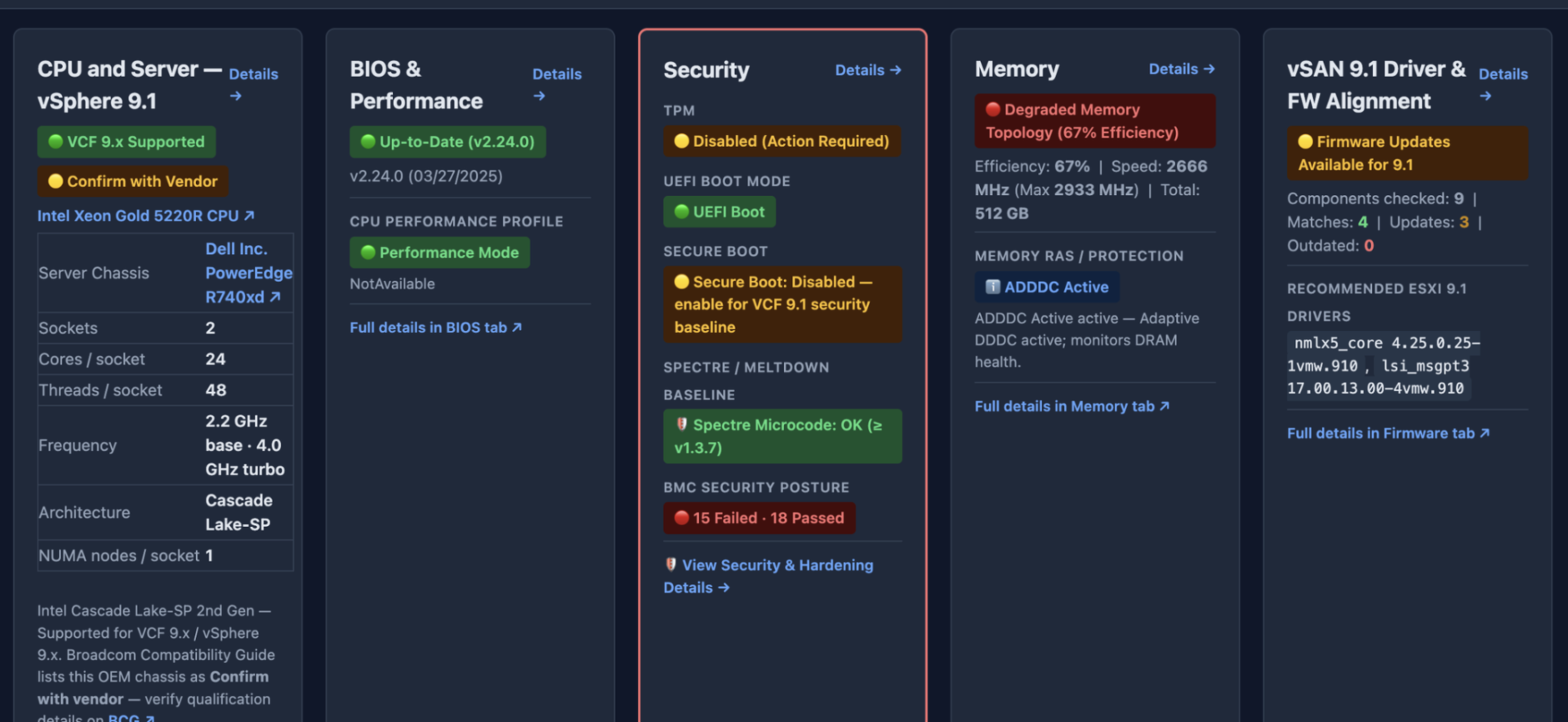
Figure 1: VCF Readiness host overview report validating CPU generation, BIOS performance profile, TPM state, memory topology, and vSAN driver alignment.
The Core Value: Validating the Physical Foundation First
The Core Value: Validating the Physical Foundation First
Security, performance, and operational stability in a software-defined data center start at the physical layer. If a server has an uncertified NVMe controller, a disabled TPM chip, or misconfigured Baseboard Management Controller (BMC) credentials, the hypervisor cannot magically compensate for those deficiencies later.
The VCF Readiness Tool addresses this by operating out-of-band and entirely agentless. It interrogates host BMCs directly using DMTF Redfish APIs, comparing your physical infrastructure against the strict requirements of VCF and vSAN before you ever attempt to stage your first workload domain or upgrade your legacy hardware.
? Hardware Security & BMC Hardening: Automated Audits
Hardware security is an essential prerequisite for enterprise architectures. Architects need to validate security posturing without causing an incident response or altering host states.

The tool incorporates over 50 built-in security and hardening audit checks aligned with official OEM benchmarks. Key security capabilities include:
- Immutable Read-Only Guarantees: The tool enforces strict, read-only BMC safety barriers alongside default-offline HCL checks. It gathers intelligence without ever altering host configurations.
- BMC Lockout Circuit Breaker: Pointing an automated scanner at a subnet with mismatched service accounts can inadvertently trigger enterprise-wide lockout policies. VCF Readiness features an immediate fail-fast circuit breaker on HTTP 401/403 responses, instantly halting scan attempts to protect management availability.
- TPM 2.0 & Platform Hardening: It actively checks Dell iDRAC security hardening (enforcing SNMPv3, verifying SEKM status, and checking Virtual Media encryption). For TPM 2.0, it prioritizes the hardware
InterfaceTypeover volatile BIOS settings to eliminate false negatives on quirky platforms.
? Storage & vSAN ESA: Zero Tolerance for HCL Discrepancies
For vSAN Express Storage Architecture (ESA), precision isn’t optional. Because ESA bypasses legacy storage layers to interface directly with NVMe drives, your hardware must match official compatibility specifications perfectly.
- Strict vSAN ESA Enforcement: The scanner actively differentiates between certified vSAN ESA NVMe drives and drives certified only for legacy vSAN Original Storage Architecture (OSA). Catching an OSA-only drive batch before deployment prevents standing up a storage architecture on unsupported hardware.
- Predictive Telemetry & Wear Data: Beyond checking part numbers, the tool surfaces physical drive health metrics. It extracts Terabytes Written (TBW) and wear percentages on Supermicro NVMe drives and resolves drive failure sentinels on Nutanix platforms.
- Intel VMD Enclosure Consolidation: Virtual Management Device (VMD) configurations can cause standard Redfish crawlers to report individual NVMe controllers as fragmented arrays, generating false RAID failure alerts. The engine merges these into unified virtual enclosures, reflecting the true topology.
- Generic OEM Translation: Redfish endpoints occasionally return generic vendor strings (e.g., “Generic PCIe Controller”). The tool resolves and promotes the true hardware model and underlying firmware strings so you aren’t left guessing.
?? Platform Discovery: Built for Scale and Speed
Enterprise server estates are rarely uniform, especially in brownfield scenarios. You deal with the messy reality of Cisco, Dell, Supermicro, HPE, and Nutanix hardware—often behaving completely differently when queried.
- Blazing-Fast Telemetry: Redfish is powerful, but poorly optimized queries can result in hundreds of individual HTTP calls per host. The tool now leverages advanced
$expandtelemetry, streaming firmware, memory, fan, and network collections in a single pull. This slashes network round trips by 60% to 76% across modern enterprise platforms, turning multi-hour cluster discoveries into scans completed in minutes. - Abstracting the OEM Mess: The engine boasts automated chassis identification for Cisco UCS B-Series and X-Series compute nodes. It also adds fail-fast timeouts on unresponsive Supermicro endpoints to stop crawler hangs in their tracks, and fixes missing OEM vendor fields for Nutanix nodes.
- Practitioner Workflows: You can use rapid shorthand notation for target ranges (e.g.,
192.168.1.10-50), and raw Redfish protocol capabilities are neatly collapsed into expandable accordions within the Web UI, keeping the host overview reports scannable and actionable.
Putting the Tool to Work
Pre-flight validation should be an automated, repeatable phase of every infrastructure design, upgrade, and lifecycle review. Verifying bare metal directly against verified VMware baselines removes guesswork, eliminates hidden deployment delays, and establishes a clear audit trail.
Don’t wait until the hypervisor is installed to find out your hardware isn’t ready. Grab the tool, run the scan, and secure your deployment timeline.
- GitHub Repository: https://github.com/vmware/vcf-readiness
- Tech Thursday Webinar Recording: https://ent.box.com/s/kjigukfpi36ne1lno3p9dhtpko93b17z
- YouTube Demos: https://www.youtube.com/playlist?list=PLIyQp4kTfTYU
Let us know what you think of the tool and share your findings in the comments over on our LinkedIn post!