The Hidden Truths of Credential Management & RBAC in VCF 9
It’s true what they say: VMware Cloud Foundation (VCF) 9 fundamentally shifts how we manage our private clouds. But getting it deployed is only step one. Unlocking its massive value—and keeping your environment bulletproof post-deployment—is where the real magic happens.
Historically, private cloud admins were forced to navigate a wildly fragmented ecosystem. You were managing identities, password rotation schedules, and access privileges across disparate interfaces—SDDC Manager, vCenter Server, NSX Manager, and Aria Suite components. We’ve all been there when a critical service account expires silently, triggering cascading authentication failures and taking down the management plane.
VCF 9 changes the game by centralizing identity and credential governance. But here is the practitioner truth: this new unified architecture comes with distinct operational caveats, rigid cryptographic rules, and a completely revamped RBAC model that you need to understand.
These aren’t deeply buried mysteries; they are powerful secrets hidden in plain sight. Let’s unpack the real-world operational truths of credential management and RBAC in VCF 9. No fluff. Just practical insights.
🛑 The Paradigm Shift: It’s Not Just “Change Password” Anymore
VCF 9 centralizes credential management through two foundational constructs:
- VCF Operations Fleet Management Console: Your unified dashboard for monitoring credential health, surfacing impending expirations, and executing password updates across the infrastructure.
- VCF Identity Broker (VIDB): Say goodbye to the legacy VMware Identity Manager (vIDM). The VIDB introduces a modernized, federated Single Sign-On (SSO) architecture that completely decouples identity verification from localized component configurations.
Within the Fleet Management umbrella, password lifecycle management is categorized into three distinct operational workflows: Rotation (automated), Updating (manual push), and Remediation (syncing back an OS-level change).
🔥 The Practitioner Trap: There is a critical architectural constraint hidden in plain sight regarding automated password rotation. According to Broadcom KB 426872, the automated “Rotate” workflow is explicitly unsupported for a specific subset of VCF Management components (including Fleet Management itself, VCF Operations, and the VIDB).
📊 The Ultimate VCF 9 Password Expiration Matrix
To give you total visibility into the credential landscape, I’ve aggregated every documented component, its associated local user IDs, expiration schedules, and supported Fleet Management workflows. Pin this up in your cubicle, bookmark it, share it with your team—this is the cheat sheet you need.
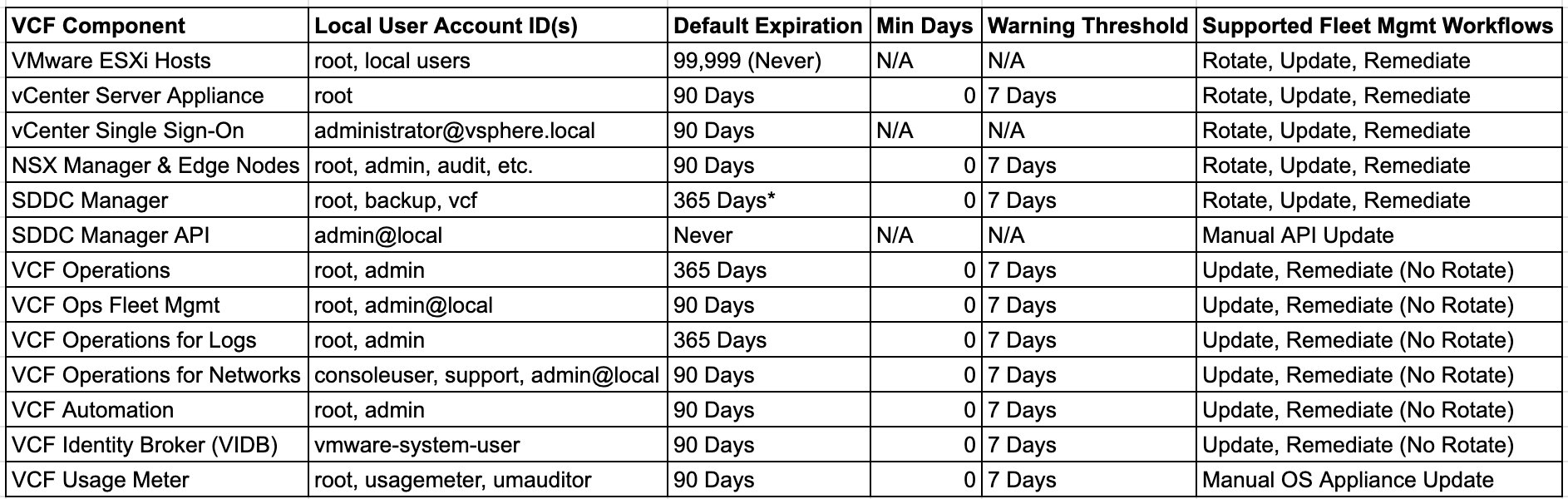
*Note: SDDC Manager defaults to 90 days for legacy upgrades.
🔒 The PAM Complexity Trap (Why Your Passwords Are Failing)
If you’ve ever tried to force a password update via the CLI and felt like the system was actively fighting you, you’ve met the Pluggable Authentication Module (PAM). The cryptographic complexity in VCF 9 is mathematically enforced to thwart brute-force attacks.
When updating a credential, your string must pass these strict parameters:
- Minimum Length (minlen): While the baseline PAM configuration often starts at eight characters, don’t let that fool you. Practitioner Truth: Specific components have much higher hard floors. NSX Manager typically demands a minimum of 12 characters, and for SDDC Manager and certain STIG-hardened Photon OS appliances in VCF 9, you’re looking at a 15-character minimum. If you try to push a 10-character password to these endpoints via Fleet Management, the task will fail with a generic validation error—always aim for 15+ to stay safe across the entire stack.
- Minimum Character Classes (minclass): Must incorporate characters from at least four distinct typographical classes (uppercase, lowercase, numerical digits, special characters).
- Unique Characters (difok): To prevent trivial iteration (e.g., lazily changing Password01! to Password02!), your new password must contain at least eight unique characters not present in the preceding password.
- Password History (remember): The system maintains a cryptographic hash of the previous five passwords and will outright reject any reuse.
🛡️ The Evolution of RBAC: Federated, Granular, and Modern
If you think you know how access is delegated in vSphere… it’s a new day. VCF 9 deprecates localized, fragmented authentication in favor of the VIDB. By validating enterprise Identity Provider (Entra ID, Okta, etc.) assertions and issuing short-lived tokens, VCF services never store or process raw user credentials.
With authentication centralized, authorization is executed locally at the component level. This unlocks true multi-tenancy and modern platform engineering:
- NSX Network Personas & VPCs: We are shifting away from blanket network admin rights. The introduction of Virtual Private Clouds (VPCs) lets Enterprise Admins carve out logically isolated network boundaries. Project Admins and VPC Admins now have absolute autonomy to provision subnets, NAT topologies, and firewalls strictly within their assigned boundaries.
- vSphere & Kubernetes Integration: VCF 9 seamlessly translates vCenter permissions directly into native Kubernetes RBAC constructs. When you assign a user a role in a vSphere Namespace, the system automatically generates the corresponding Kubernetes ClusterRoleBindings. CLI (
kubectl) users face the exact same constraints as GUI users. It’s brilliant. - VCF Automation Multi-Tenancy: Access is strictly divided across Provider and Organization planes. Provider Admins manage global integrations, while Organization Admins construct localized self-service catalogs.
🛠️ Strategic Operational Next Steps
You’ve already got the tools—now it’s time to use them effectively.
To keep your deployment bulletproof, you must architect robust day-two procedures that aggressively monitor the 30-day and 7-day expiration alerts generated by VCF Operations. Get into a proactive cadence: execute manual Update or Remediate workflows for all management components well before that window lapses.
Simultaneously, leverage these advanced RBAC capabilities to minimize your reliance on local credentials entirely. By mapping your enterprise identities to specific, least-privilege roles, you can ensure the sprawling capabilities of your private cloud are consumed safely, efficiently, and in strict adherence to Zero Trust.
Essential Practitioner Reading & Resources:
- Service Account Design for VCF: Broadcom TechDocs Library
- Default Password Policy Settings: VCF Default Policies
- Password Rotation Limitations (KB 426872): Broadcom Support
If you’re not already subscribed to The Architect’s Edge newsletter, now’s the time. Stay ahead of the curve with real-world strategies for VMware, VCF, and beyond.
💬 Have questions about your path to VCF 9 or using VKS on VCF? Drop them in the comments or message me—we’re all navigating this together.
🔄 Like, repost, or tag someone planning their next platform move.
This article is part of the Architect’s Edge Insights series — designed to cut through confusion and deliver clarity on VMware Cloud Foundation. Stay tuned for upcoming posts as we continue to simplify VCF adoption, operations, and optimization.
Public technical reference (added October 2026): Broadcom’s VCF 9.1 Identity and Access Management Best Practices discusses management-plane identity isolation, MFA, privileged access and independent account recovery. This is further reading, not a claim that every procedure in the earlier article was validated against 9.1. For the newer product-specific identity changes, see Broadcom’s October 2026 overview of VCF 9.1.1 Single Sign-On enhancements and confirm applicable identity-provider integration guidance before making configuration changes.
#VMware #VCF9 #VMwareCloudFoundation #CloudArchitecture #CloudSecurity #ZeroTrust #RBAC #CredentialManagement #InfoSec #EnterpriseArchitecture #PlatformEngineering #ITOps #CyberSecurity #Broadcom #SDDC #PrivateCloud #ArchitectsEdge
Originally published on Architect’s Edge on LinkedIn