VCF Defeating the Patching Cycle in the AI Era of Security Threats
If you have been managing infrastructure for any length of time, you know the deep, existential dread of “Patch Weekend.” 😨 Historically, it meant babysitting progress bars, holding your breath during hardware reboots, and praying DRS didn’t paint you into a corner.
But the game has fundamentally changed. We have entered the AI era of security threats 🤖🚨. With advanced AI models now capable of autonomously scraping, analyzing, and uncovering decades-old zero-days in core infrastructure code, the volume and velocity of critical CVEs are skyrocketing. The days of deferring patches for a quarterly maintenance window are over. If a severe vulnerability hits, you need to patch now, not next month.
Let’s dig deep into how Broadcom has evolved the patching architecture from the brute-force days of vSphere 7.0.3 through the highly refined VCF 9.1 to make surviving this new era possible. We will also run the math 🦼 on exactly what this means for a standard 100-node cluster.
🔴 THE BASELINE PAIN: LEGACY PATCHING (vSPHERE 7.0.3)
To appreciate where we are, we must look at the baseline pain of vSphere 7.0.3 using legacy update mechanisms. If a patch required a reboot, you were locked into a brutal, serialized physics problem.
The Per-Host Math (Traditional Reboot):
- 1️⃣ Download & Stage: ~2 mins.
- 2️⃣ Evacuate VMs (vMotion): 15-20 mins (Highly dependent on VM density. Moving 1TB+ of active RAM takes time).
- 3️⃣ Enter Maintenance Mode (MM): ~1 min.
- 4️⃣ Apply Patch: ~5 mins.
- 5️⃣ Hardware Reboot & Init: 10-15 mins (Server POST, memory checks, loading ESXi).
- 6️⃣ Verify & Exit MM: ~2 mins.
⏱️ Total Time: ~35 to 40 minutes per host.
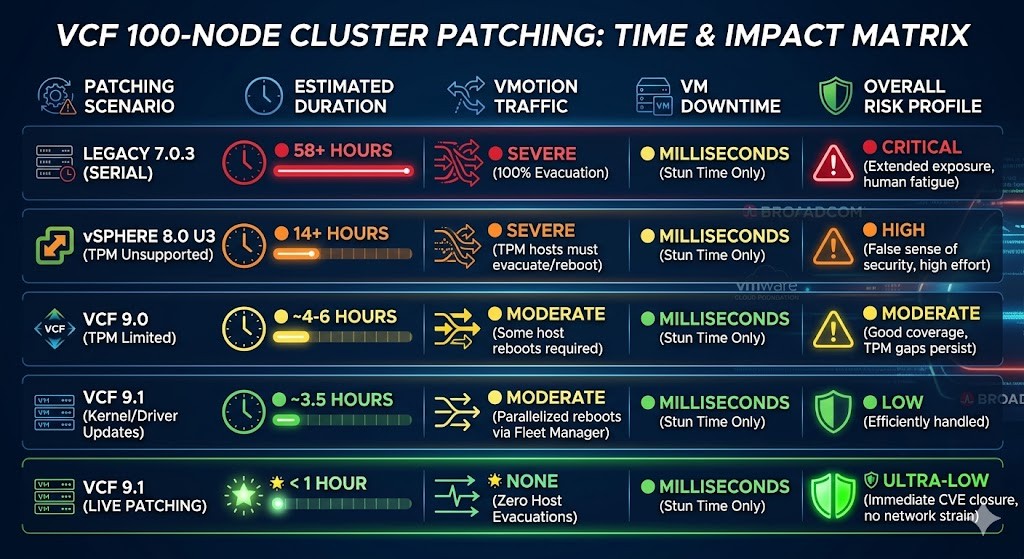
For a 100-node cluster, if done strictly sequentially, that is over 58 hours of continuous operations. Even if you parallelize and patch 4 hosts concurrently, you are staring down a 14+ hour maintenance window. You are stressing your network with massive vMotion storms and risking performance degradation. When multiple security patches drop in a single quarter, the operational risk profile of staying on 7.0.3 becomes unacceptable.
🟠 THE FALSE DAWN: vSPHERE 8.0 U3
It is important to address the elephant in the room 🐘: vSphere 8.0 U3 introduced the concept of Live Patching (Fast-Suspend-Resume), but for the vast majority of enterprise environments, it was a false dawn.
While the underlying technology was promising, its real-world applicability was severely limited. Crucially, if you were following basic security best practices and had TPM (Trusted Platform Module) enabled on your ESXi hosts, you were entirely locked out of the Live Patching workflow 🚫. It also lacked coverage for many core hypervisor components.
If you are currently sitting on 8.0.3 thinking you have a modern patching strategy, you are likely falling into a trap. When a critical CVE drops, you will almost certainly find that 8.0.3’s Live Patching doesn’t apply to the specific component or your hardened hardware, forcing you right back into the 14-hour vMotion-and-reboot nightmare we just calculated. This version should be viewed as a stepping stone, not a destination.
🟡 THE TURNING POINT: VMWARE CLOUD FOUNDATION 9.0
VCF 9.0 was where the promise of reduced downtime finally started becoming a reality, largely by addressing the management plane and broadening hypervisor coverage.
- 🔹 vCenter Quick Patch (Reduced Downtime Upgrade): VCF 9.0 perfected the vCenter upgrade. Instead of taking a snapshot and bringing the management plane offline for 45-60 minutes, 9.0 spins up a new vCenter appliance alongside the old one. Data syncs in the background, slashing vCenter downtime to under 5 minutes.
- 🔹 Broader ESXi & NSX Coverage: Live Patching component coverage was significantly expanded beyond the base hypervisor. By integrating support for NSX transport nodes and critical user-space components, far fewer patches required disruptive host evacuations or network realignments.
However, VCF 9.0 still had a critical gap: TPM-enabled hosts were still largely excluded from the party 🚧.
🟢 THE MODERN STANDARD: VMWARE CLOUD FOUNDATION 9.1
VCF 9.1 is the ultimate fix 🚀. It takes the foundational tech of 8.x/9.0, removes the roadblocks, and scales it for the enterprise fleet to directly combat the velocity of modern AI-driven threats.
- ✅ TPM-Enabled Live Patching: The biggest hurdle is gone. VCF 9.1 fully supports Live Patching for TPM-enabled hosts. You no longer have to choose between hardware-level attestation and zero-downtime patching.
- ✅ NSX & User-Space Coverage: 9.1 introduces user-space live patching and, crucially, NSX transport node live patching without an ESXi reboot.
- ✅ 80% Live Patch Coverage: Broadcom’s engineering now allows up to 80% of critical security patches to be applied via Live Patching without host evacuations.
- ✅ 4x Faster Fleet Upgrades: For the 20% of patches that do require deep kernel changes and hardware reboots, VCF 9.1’s automated fleet operations execute cluster upgrades 4x faster than previous versions.
📊 THE 100-NODE TIME & IMPACT MATRIX
Here is how the risk and timing stack up for a standard 100-node environment when a severe CVE drops:
The TPM Breakthrough
While the matrix above clearly shows a monumental shift in duration and risk profile, the silent hero enabling that ultimate “< 1 Hour" scenario in VCF 9.1 is full TPM (Trusted Platform Module) compatibility.
In previous iterations (like 8.0 U3 and 9.0), following basic security best practices by enabling TPM effectively locked you out of Live Patching. You still had to evacuate VMs and reboot the hardware to satisfy attestation, dumping you right back into the 14+ hour nightmare.
VCF 9.1 completely removes this operational blocker. You no longer have to choose between strict hardware-level attestation and zero-downtime patching. Your security posture is maintained, and operational friction is eliminated.
💡 The Architect’s Takeaway: In a world where AI can find and exploit zero-days in record time, your time-to-patch is your single most critical security metric. Sitting on 8.0.3 is an operational liability. Upgrading to VCF 9.1 isn’t just an infrastructure enhancement; it is a mandatory defensive capability. It finally allows you to completely decouple security patching from infrastructure downtime.
📚 RECOMMENDED RESOURCES & FURTHER READING
For those of you ready to dive deeper into the architectural shifts and requirements for VCF 9.1, check out these official Broadcom resources:
- 🔗 VMware Cloud Foundation 9.1 Announcement & Innovations
- 🔗 What’s New in VCF 9.1 (Broadcom TechDocs)
- 🔗 Upgrading to VMware Cloud Foundation 9.1
- 🔗 Deploy VCF Operations as Part of a VCF 9.1 Upgrade
💬 Have questions about your path to VCF 9.1 or using VKS on VCF? Drop them in the comments or message me—we’re all navigating this together.
🔄 Like, repost, or tag someone planning their next platform move.
This article is part of the Architect’s Edge Insights series — designed to cut through confusion and deliver clarity on VMware Cloud Foundation. Stay tuned for upcoming posts as we continue to simplify VCF adoption, operations, and optimization. Read the original article on LinkedIn.
Public technical reference (added October 2026): Broadcom’s VCF 9.1 Rapid, Non-Disruptive Security Patching explains payload eligibility and the operational limits of Quick Patch, ESX Live Patching and rolling updates. Actual availability depends on component versions, compatibility and cluster capacity.
#VMware #VCF9 #VMwareCloudFoundation #CloudArchitecture #CloudSecurity #ZeroTrust #RBAC #CredentialManagement #InfoSec #EnterpriseArchitecture #PlatformEngineering #ITOps #CyberSecurity #Broadcom #SDDC #PrivateCloud #ArchitectsEdge #vSphere #LivePatching #ZeroDay #PatchManagement #ZeroDowntime #CloudArchitecture #ITOperations #Broadcom #vExpert