Whoa, whoa, whoa wait a minute WTF? FREE EXAMS? WHERE DO i SIGN UP?! Hold a minute. This isn’t just an arbitrary free exam.
This is an arbitrary exam which comes with a Prep Guide and a wealth of training and education to SUPPORT your taking and passing the exam! <3
Steps Steps Steps! Wow, it can’t get easier than this (Okay, it can!)
It all starts at the Learning Center which breaks down each portion of the exam into Exam Objectives with respective training, education, videos and webinars, books and reference material and a load of other resources like SolarWinds Labs to help prepare and educate you for success!
Registering for the Exam consists of sending an email to the SolarWinds folks providing some details and then M-F within a decent period of time (It took me less than a days time) I received the link and credential information to take the SolarWinds Certified Professional Exam!
And Poof, that’s it! Prepare, Register and then take the exam from the comfort of your own respective computer, no magical testing center to go to or lines to stand in! If you think it can’t be this easy, I have to say, wow it is. So if you find yourself as someone who has or does work with SolarWinds or someone who WANTS to add that line item to their resume and career profile then look no further than this as a good way to progress!
One cool thing I learned recently is that SolarWinds model is “Try before you buy” and all of their products are available for a free 30 day trial to get your feet wet and see if it does what you want it to. Fast, Ready, and easy to work with spells awesome!
Maybe you’ve heard all the rage about the new Certification Exams from VMware at the Associate Level called the VCA! (VMware Certified Associate) and maybe you haven’t! Well, guess what, You’s gonna hear about it now! :) So a few things regarding these new Associate level certifications…
THEY’RE FREE TO TAKE AND INCLUDE FREE TRAINING!!!
And the test is delivered via the Web – Online from where you are!
###UPDATE!### – Inline in the comments Phil Wiffen points out what I had forgotten… The code is valid until at LEAST Nov 15th, so act SOON! Also you must take the exam within 48 hours of booking it (hence it expiring in 2 days).
Yea you heard me right. Now this won’t be free forever, but right now if you use the right formulae of success criteria (detailed inline here) you can get this for free. I’ve heard rumor this expires at the end of this year so get it done STAT! I also heard rumor it expires at the end of November, again knock it out!
You can start out by visiting the VMware Pearson Vue site located at http://www.pearsonvue.com/vmware/ which gives you a handy dandy screen like this..
Below this little list here includes a whole bunch of links you can use to go and register for Authorization and Register for Exams. If you read a previous blog post A Must-Read before taking your next #VMware VCP or VCAP Exam!!! it included the steps of how to go about requesting authorization to take an exam. But I’ll mention it here, you’ll need to request authorization to take the exam before you can even register for the exam, and thus schedule the exam respectively!
Free Online Training Resources:
VMware Certified Associate – Data Center Virtualization
This little list here not only includes a link to take you directly to the FREE training videos, but the grouping below also takes you to the individual sites for each track to Request Authorization and Register for the exams!
Simply click "Request Authorization" for an exam – and then choose the "Register for the Exam" option!
Then click "Schedule an Exam" after which you select the “Associate and Professional Level Exams” and you’ll need to login then!
If you’ve never done an Online Pearson Vue exam you should create a web account. The process whereby you requested authorization will supply you with the Candidate ID which is required to make this setup complete! I ran into the problem whereby my account was sort of messed up and tied to another account which did not let me login. As I know that VMware Education is so good at cleaning up and merging accounts…. I opt’d to create a new account on a different email alias of mine which also created ANOTHER Candidate ID, but at least it let me register then! :)
After logging in you should have the option to Register for a Pre-Approved exam!
WARNING! Unless you’re rocking your Chinese … Change it from the DEFAULT!
OMG ITS $120 YOU LIED TO ME! YOU SAID IT WAS FREEEEEEEEEE!!!!!!!! whoa, hold on there!
MORE LIES! YOU SAID ITS FREE NOW ITS ONLY HALF PRICE!@#!@#$@#!@# Don’t fret yet… wait until you get to the Payment Screen..
OMG OMG OMG ITS FREE FREE FREE! Yea. Get it while you can! For some reason mine said mine is only able to taken over the next 2 days which scares me into thinking OMG this won’t last… So get out there and register!
From 2001 until 2006 I would regularly do presentations on OMG THERE’S FREE TRAINING OUT THERE WHY AREN’T YOU USING IT. Which even culminated in the release of a Technical Offerings training deck as noted in this blog post I published in 2006 (Yes, Seriously, in 2006) Well, guess what. A lot of that data is STILL highly relevant even today! So… Let’s get started! :)
Training Videos
Microsoft
Kicking off the realm of training videos I’d like to highlight our good friends at Microsoft with their release of the Microsoft Virtual Academy!
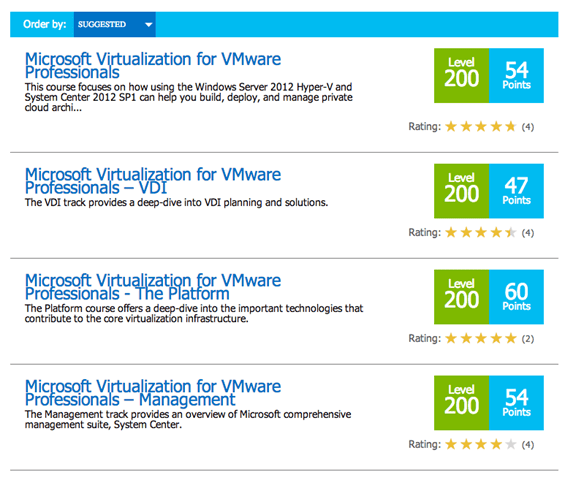
The MVA has a LOAD and I mean a serious LOAD of information, from Training Videos, Courses, Tutorials, Walkthroughs, even Tests and points and contests to increase not only the ‘fun factor’ but provide additional context in your education. For those of you VMwarriors out there who will discard this and say BLAH, SHOW ME THE VMware STUFF. I even did a little search for VMware in the “Quick Search” button and lo and behold lookie at the results!
So whether you are a rockstar, a seasoned professional or someone looking to get started and want to know where to get some good and valuable information without spending hours and $$$ in a classroom, this is definitely an excellent way to get started, so jump on in!
BUT WAIT, THERE’S MORE FROM MICROSOFT?!?!
I know some of you are fighting the constant battle of “Damnit, can I attend Microsoft TechEd or not…” And with TechEd 2013 going to be in New Orleans I cannot blame you in the LEAST! But for those of you who just truly cannot find the time, the ability and are able to get away… something you should know.
ALL MICROSOFT TECHED CONTENT IS AVAILABLE FREE WHETHER YOU ATTEND OR NOT.
Yea. Seriously. It is. It actually has been for like the last… Oh I don’t know… since 2004 I believe? And all of that past-content since they started posting and making it available online has been posted online. For some reason I’m only able to find the 2012 content and the 2011 Archive but who really needs access to material on product versions which may not even exist or are supported anymore, if you truly need that let me know and I’ll find the link!
TrainSignal
A lot of you are familiar with TrainSignal and the loads of great content they create, produce and respectively sell out there (You can get access to their paid training video series and content on their website, Trainsignal.com) But when I reached out to their President asking, “Hey, you have any freeeeeee stuff!?!?!?” He pointed me over by here! So here is a whole bunch of videos freeeeeeeeeeeee of charge! And of course, don’t hesitate to check out the amazing content produced by the likes of Scott Lowe and David Davis and others!
Ya know… as an example here! :)
That should get you going on quite a load of stuff from Microsoft, to VMware, to Citrix and Cisco and beyond! But let’s drill down a bit into VMware now…
VMware
When it comes to VMware there are loads and loads (and loads) of information in the world, and often we never really know where to start… Well, here is a place to start and it’s home is in YouTube!
Yea, that’s lame right? I mean on YouTube there’s like a dozen channels?!?! Well, there are. Just go and use them. BAM, and BOOYAH.
VMworld Presentations are FREE TOO LIKE TECHED?!?!?
Well, no. Not exactly. Sorry! Although this last year VMUG Advantage did have a brief offer for free access to the VMworld content if you signed up for that… I’m unable to find any data on it at the moment, so that may have expired, but it’s still worth checking out!
SHOW ME THE LABS BABY!
You asked for Labs and here they are! More labs than you can shake a stick at!
Err, okay, maybe that was a little too literal! Let’s get on with our labs though!
FREE Hands On Labs from Microsoft!
The thing about Microsoft is… for 8+ years they’ve had FREE access to all of their products in a Try-Before-You-Buy model where you can DOWNLOAD any Product and play with it (okay, seriously that’s been around for going on 20 years) but they also instituted the Hands On Labs where the lab environments would BUILD themselves, provide you with a Lab guide to follow (or ignore) and learn and play with it that way. Not to mention all of the content they’d have in the Hands on Labs at TechEd would be POSTED and made available for you to go in and learn, explore and beyond!
This isn’t something new, it’s been around FOREVER, Here are links to where you can access it (as it’s actually available in several places).
Disclaimer: When I wanted to test something out, I’d spin up a lab which was designed to ‘best practice’ and go in and do whatever I wanted, I mean it was a lab environment available in minutes. Why not?
Interesting Fact, some of the types of labs and solutions available out there which you can play and learn from:
How to setup a product from scratch, like Sharepoint, Microsoft Exchange, SQL
How to MIGRATE a product from one version to another (like those products mentioned above and more)
How to Develop in a language like C#, Visual Studio, Azure, PowerShell and more
How to do other advanced types of things
Alllllllllllll the labs that were available at TechEd, so you know what that means… and if not, check it out!
You can find TechEd Labs in the Additional Content section here with this flask icon next to it!
Here at the MSEvents site there are a number of Virtual Labs on the “Virtual Labs” tab to choose and play from!
At the TechNet Virtual Labs site you can dive a little deeper on more Microsoft Technologies…
Looking to dive even deeper, the MSDN Virtual Labs site will take you there.
So if for a minute you thought this was going to be easy, or a single click site with all the answers. HAH.
FREE HANDS ON LABS FROM VMware?!??!
Well, not exactly.. I mean, sort of, kind of… but, well, let me explain. VMware recently announced “Project Nee” my dear friend Simon Seagrave talks about about it here at his blog. But ultimately, what Project Nee is intended to be is… VMware Hands On Labs publicly available online. However it is still in Beta at the moment. You can follow details of the VMware Hands On Labs by going here to the VMware Hands On Labs community!
Some additional places not even mentioned but you should check out, and all of the cited links for easy access and consumption:
So hopefully those of you out there who are looking to stay relevant, continue educating yourselves, maybe even heading down the certification track and whatnot will find this of benefit. I won’t lie to you, I’ve used these resources countless times over the years and I encourage others to. If you have any other sites to suggest, toss em into the comment section… This is an epic resources to reference from here until well.. until I write another one ;)
We all know how these things go, content creators create content, votes happen whether strictly or arbitrarily and then BAM! You get placed on a list!
It’s kind of interesting, kind of flattering, and well, I’m sharing it here because it happened! Here is the snippet of me, and behind the more there are the 99 other blogs mentioned and referenced! I do wish you the best in finding good content here and without! :)
Well, the fateful day has arrived, and that day is good! Welcome one and all of the #EMCElect ! ! !
I guess we start off a bit in reference to the title of this blog post, oh my! You may be sitting here wondering what this MVP/vExpert-like program is about!
What exactly IS EMC Elect?
I find this can be readily answered by looking at the EMC Elect Charter – which I know all of you will immediately click and find out all about it! And… because you won’t, here is the straight scoop on it!
The team at EMC has designed a program to span the gap between brand loyalty and brand advocacy.
EMC Elect is a community-driven recognition designed to award investment and engagement of individual contributors with the EMC brand. The resulting status symbol will be held with high regard as an industry standard representing thought leadership in the fields of data center management, cloud computing and big data.
Members will be determined by peer nomination for their holistic social engagement for the previous calendar year.
Rewards for participating EMC Elect will receive unprecedented connection into product teams through dedicated liaisons.
EMC Business Units, by participating, receive a low-latency, trusted connection into the highest value influencers in our social ecosystem.
Alright, so that says a whole bunch of stuff, but what does it really mean? These are like the brand champions, the evangelists… Often times, honestly… the same people you often ASSOCIATE with EMC whether they work there or not. Take @mrdenny Denny Cherry, He is a rockstar in his own right and when I think of SQL and SQL books I think of him, but he also knows a boatload about EMC Products and isn’t shy about keeping it honest when it comes to the good, the bad and the respective ugly. And you think about @sixfootdad Damian Karlson, while he works for EMC Consulting he is holistically focused on the whole of the Virtualization and Cloud communities, yet he doesn’t have the wool over his eyes when it comes to knowing the value-add and the EMC Portfolio, and he exemplifies that in his writing, his community and otherwise involvement… So these are just a few examples of the many!
Who exactly ARE the EMC Elect?!?!
It was announced just last night, this handy link which takes you to the 75 members who are now the EMC Elect 2013!
For those of you active in Storage, Cloud, Virtualization, EMC Specific technologies, and the like… You’re bound to recognize quite a number of those names; Off the top of my head and just glancing at the list the likes of…
Matthew Yeager, Erin Banks, Jase McCarty, Mark Twomey, Matt Cowger, Jason Nash, Simon Seagrave, Preston De Guise, and Rob Markovic are a few which just happen to jump out. In all actuality I recognize most of the people on the list (yay me, right?) Yes I am also on the list, but I digresssssssss! :)
What matters by exactly who they are will really shine forth in this little diatribe I like to call…
Err, so this is the EMC Elect, huh? HUH?! So… Why should I CARE?!?
That’s right. Why should you care? Great question, great point indeed!
If you do happen to know and recognize one or more of those names and you’re involved in this industry something rather common will start to shine through for those individuals… They tend to be very active, vocal and share with the community. You’ve probably read a blog of theirs, seen a video, read a whitepaper they wrote, watched one of their presentations, been to one of their parties! ;) Thus whether you realize it or not, they’ve had some kind of impact on your life, directly or indirectly and this takes it up a notch. In this first year of kicking off the EMC Elect there were a total of 270 Nominations, 124 finalists and in the end… the directory shows 75 total members of this first year of EMC Elect. I did some rough math on comments that it looked like a lot of EMC People are on the list, and I show around 8% of the total list are EMC Employees (my math may be wrong, as it’s just on spec and names I recognize, but not too horrible, considering how many of these people go above and beyond in their personal lives as well as professional!)
So in the end… why you really should care is… you’re bound to start to hear even more, useful, fruitful and quite amazing material and content coming from some of these gems of industry, and not just from the standard internal only folks… If this program is everything we can hope and dream it to be… we might find out about things, oh.. I don’t know, maybe BEFORE Chris Mellor from the register announces it to us a week before it comes out or something :)
Good luck, Good blogging, and OMFG have an AWESOME 2013! I know I will! :)




 flask icon next to it!